TurfPro -
A football turf booking app
A community-first sports turf booking experience
Mobile App
Venue Booking
Material Design
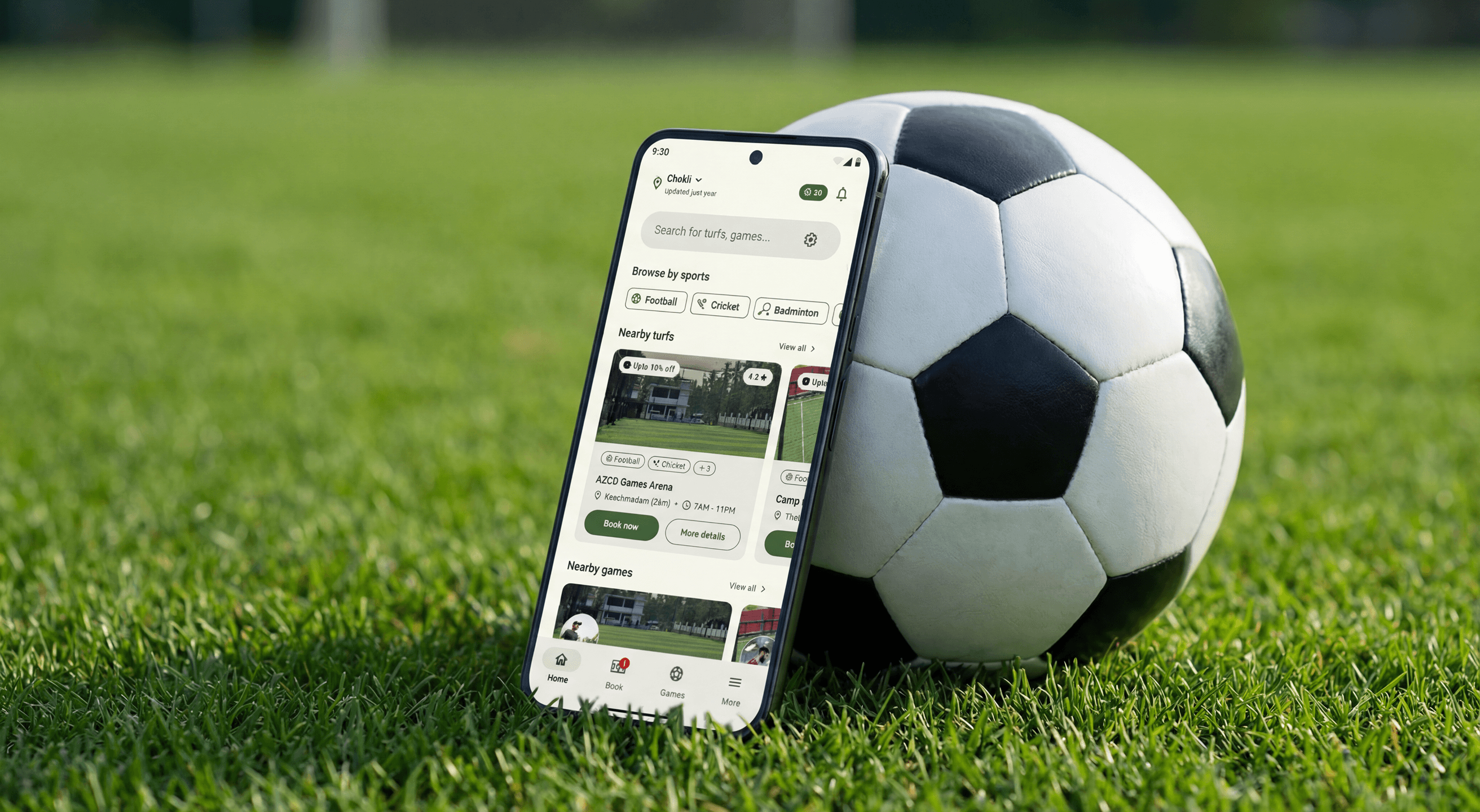
“Imagine booking a sports turf as easily as you plan the game itself — quick, predictable, and built around how people actually play.”
SKIP TO FINAL DESIGN
Role
Product Designer
DURATION
Jan 2024 – Mar 2024
(Concept to high-fidelity execution)
Focus Areas
End-to-end mobile UX
Booking flow optimization
Navigation & information hierarchy
Feature prioritization & restraint
Dark mode design


The
Origin
TurfPro began with a very local frustration.
In my community, booking a sports turf usually meant calling the venue, sending messages, waiting for confirmations, and following up again to make sure the slot was actually secured. Availability wasn’t always clear, cancellations were messy, and payments were often handled separately.
While popular turf booking apps existed in other regions, they either didn’t support venues in my area or didn’t reflect how people here actually book and play.
That gap — between how people wanted to book and how the system behaved — became the starting point for TurfPro.
Patterns
I Noticed
As I looked closer at existing turf booking apps, the gap wasn’t about missing features — it was about misalignment.
In my community, there were only two real players. One had strong UX maturity and scale, but didn’t support local turfs at all. The other supported nearby venues, but struggled with usability, navigation clarity, and visual consistency. In both cases, the core job — booking a turf quickly and confidently — was harder than it needed to be.
What stood out was that neither app failed completely. They failed in different ways, leaving a clear opportunity between them.
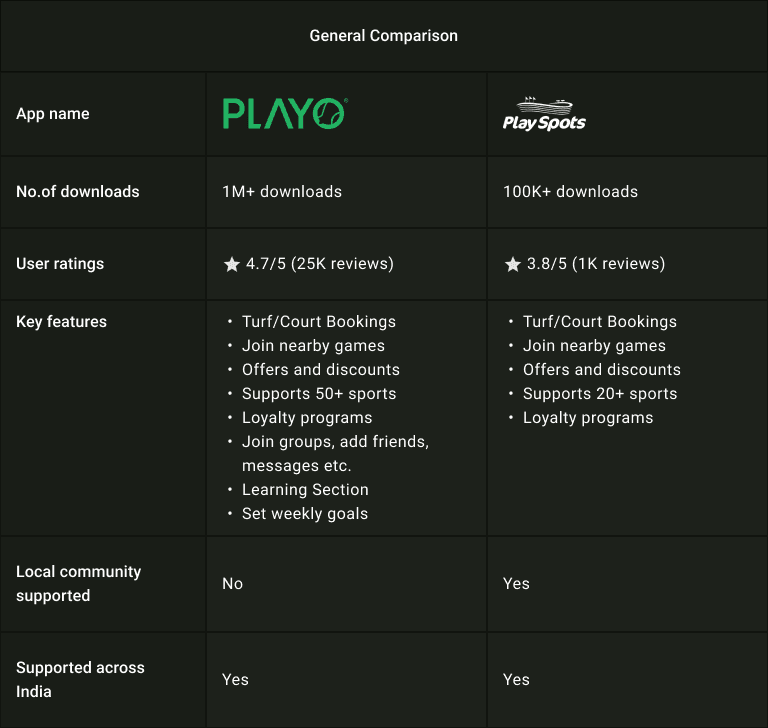
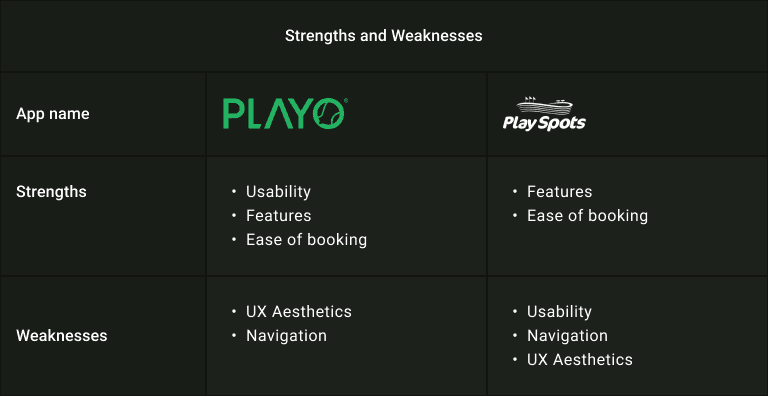
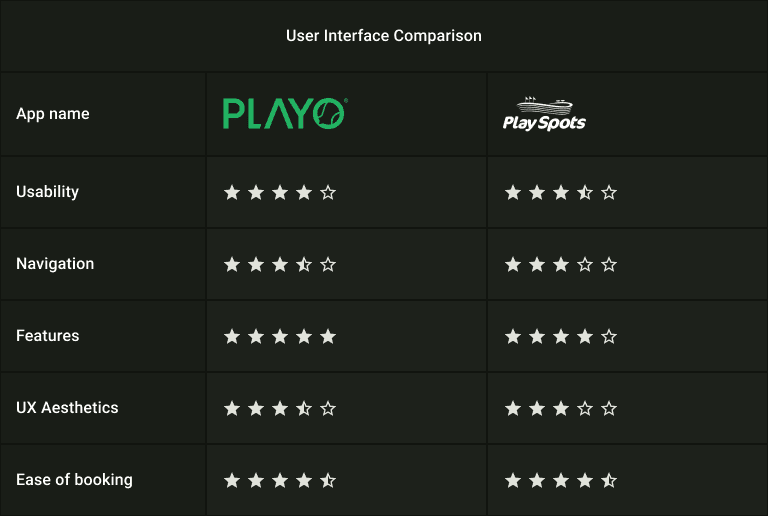
Comparing scale, usability, and interface quality across the two dominant turf booking apps revealed a gap between local relevance and UX maturity.
From this, a few clear insights surfaced:
One app prioritized scale and features, but lacked local coverage
The other supported local venues, but fell short in navigation and visual clarity
Booking flows were often dense and cognitively heavy
Navigation didn’t consistently prioritize the primary action: booking
TurfPro didn’t need more features — it needed clearer hierarchy, simpler booking, and a locally grounded experience without inheriting existing friction.
Design System
Choice
Before moving into screens, I needed to make a foundational decision: what design system could support speed, clarity, and long-term consistency for a utility-heavy booking product.
TurfPro wasn’t meant to feel flashy. It needed to feel familiar, predictable, and fast—especially for users booking turfs minutes before a game. That pushed me toward a system that already solved common interaction problems well.
This is where Material Design made sense.
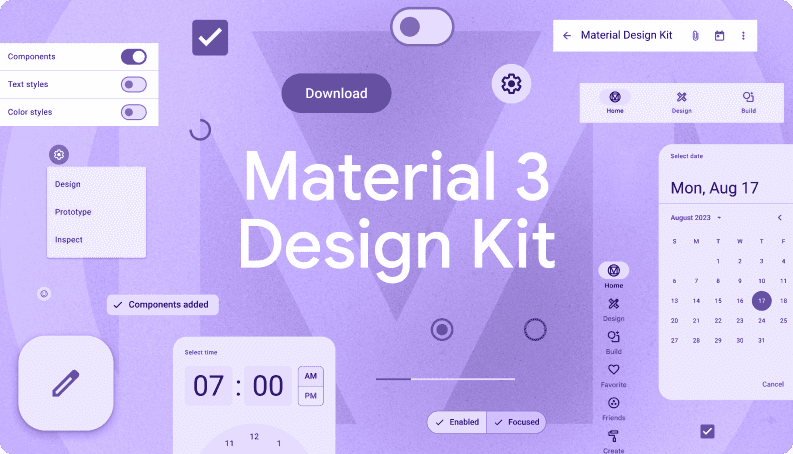
Instead of building components from scratch, I chose to work within Google’s Material Design (Material 3) ecosystem. The decision wasn’t about convenience but more about design discipline. Material provided:
A mature component library that scaled well across complex flows
Clear guidance for states, inputs, errors, and system feedback
Patterns that users already subconsciously understand
For a booking-focused product, this reduced friction and allowed me to focus more on flow clarity and edge cases, rather than reinventing UI behavior.
Visual Language &
Color Decisions
Once the system was locked, the next question was tone. TurfPro is rooted in sports, turf, and outdoor activity. Green wasn’t a branding decision—it was a contextual one. Using green created an immediate visual association with the physical spaces users were booking.
Rather than a single palette, I defined separate light and dark mode palettes early, so contrast, readability, and accessibility wouldn’t be afterthoughts later.
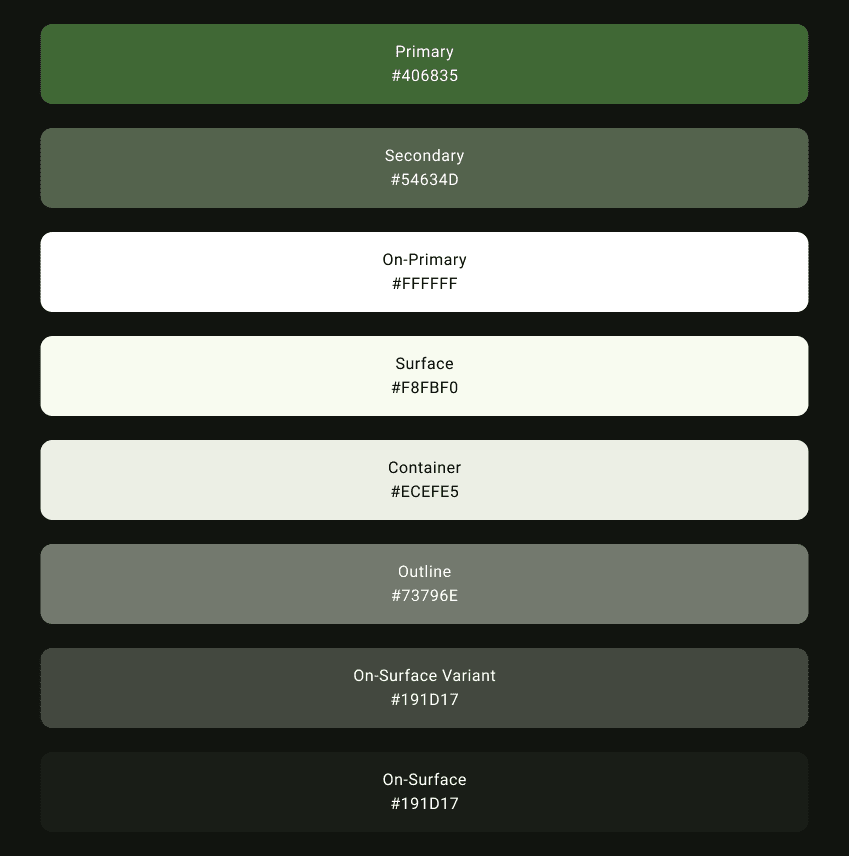
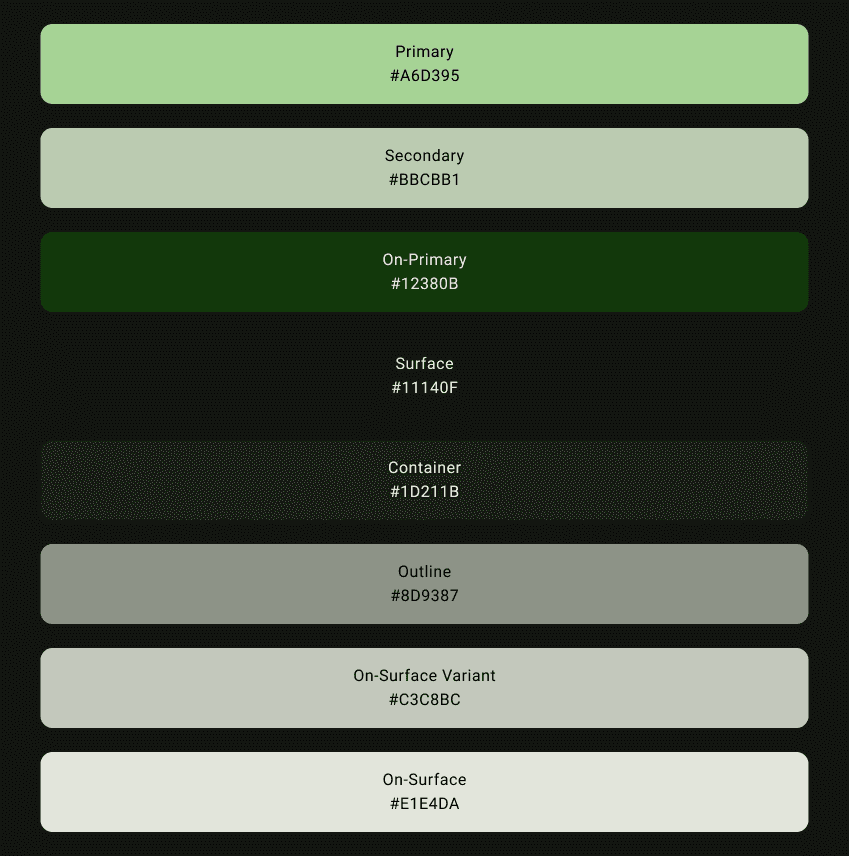
Color palettes defined early to ensure clarity, contrast, and consistency across both light and dark environments.
Every screen in TurfPro exists for a reason—to make booking a sports turf fast, predictable, and stress-free.
1. Onboarding:
Getting Users to the Pitch
What THESE screenS is about
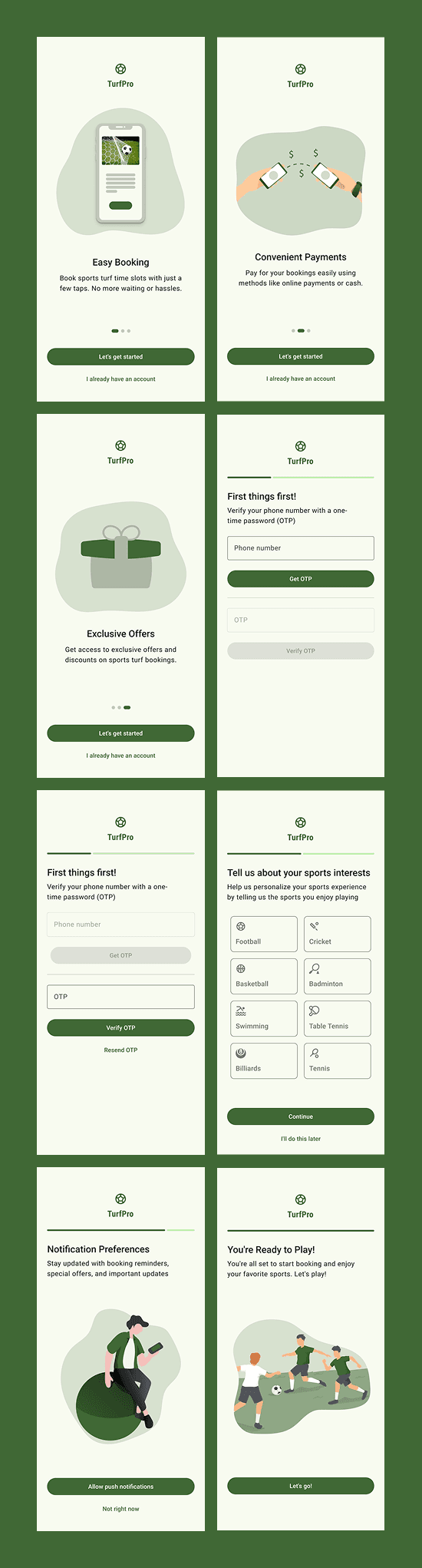
For TurfPro, onboarding isn’t about explaining the product — it’s about getting users ready to book as fast as possible. Most users open the app with a clear intent: find a turf, book a slot, play.
I treated onboarding as a lightweight ramp, not a funnel. Each screen exists to remove friction before the first booking, not to sell features or overwhelm new users.
The flow balances two things:
Setting expectations (what TurfPro helps with)
Collecting only what’s necessary to personalize and proceed
Key decisions
Onboarding focuses on outcomes, not feature explanations
OTP-based login used to remove password friction
Personalization steps (sports, notifications) are optional, not blocking
Progress indicator sets clear expectations without urgency
Final screen reinforces readiness instead of asking for more input
2. Home:
Discovery First, Creation One Tap Away
What this SCREEN is about
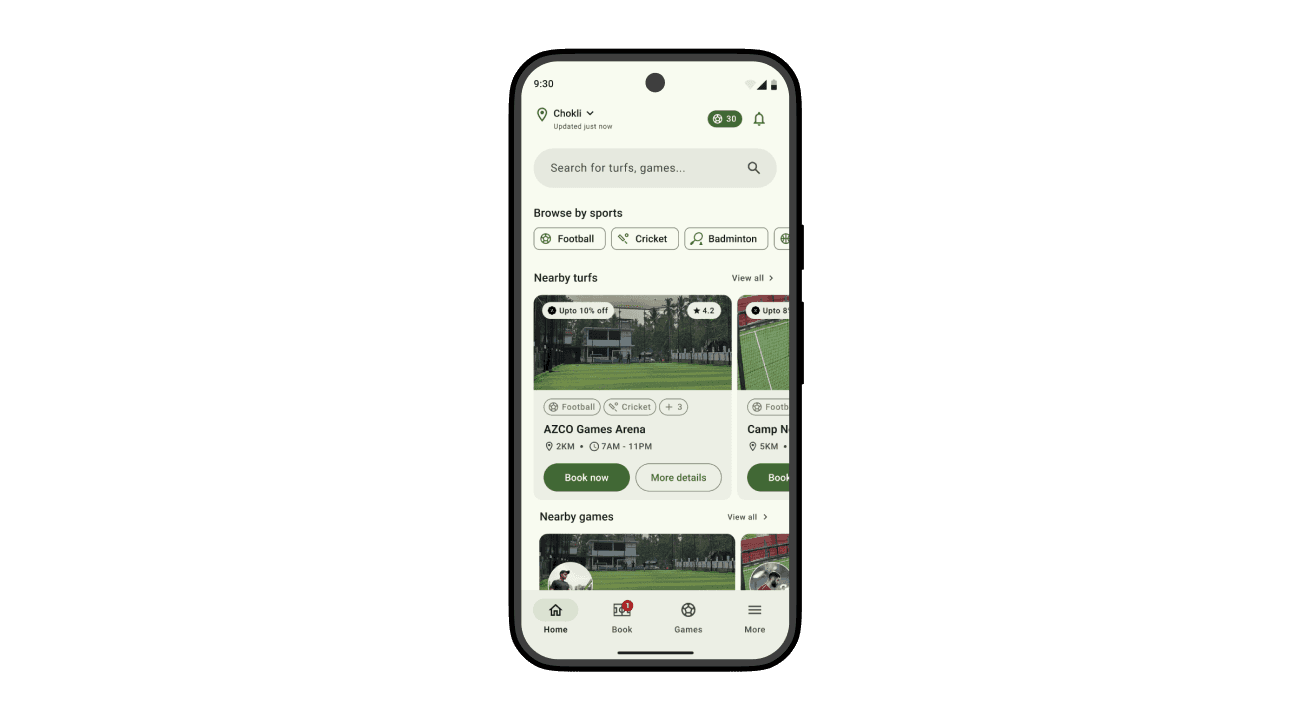
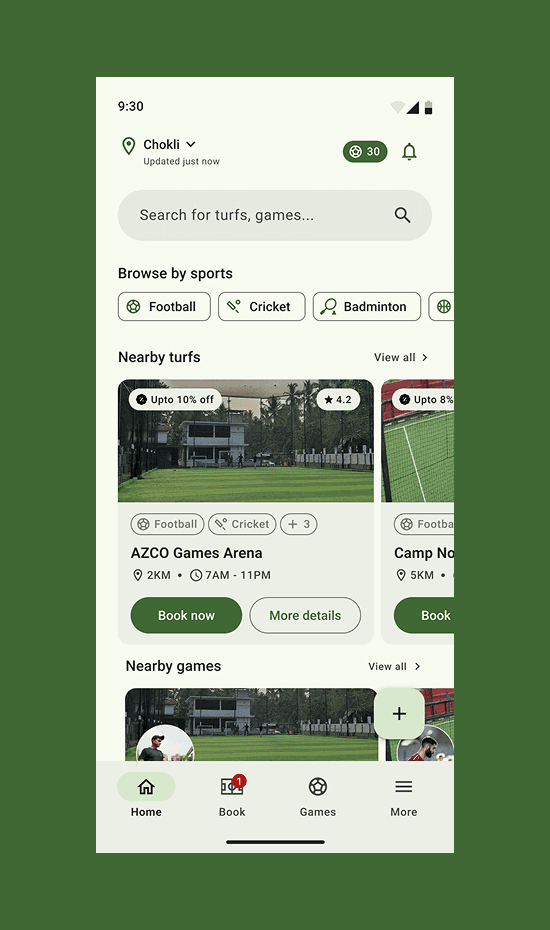
The Home screen is designed as a discovery-first surface. Its job isn’t to make users think — it’s to help them act quickly based on location, sport, and availability.
Instead of pushing users into filters or deep navigation, Home answers three questions immediately:
Where am I?
What can I play?
What's available right now?
Search, browsing, and booking are intentionally layered so users can either explore casually or move straight into action without friction.
The floating + button exists as a deliberate escape hatch for users who already have a plan — specifically for creating a game. This prevents the Home feed from turning into a cluttered action board, while still keeping game creation instantly accessible.
Key decisions
Home remains read-only by default, focused on discovery
Search supports both turfs and games to avoid mode switching
Sport filters enable fast narrowing without entering a separate flow
Nearby turfs and nearby games are visually separated to clarify intent
Turf cards optimized for comparison (distance, time, rating, offers)
Floating + reserved strictly for Create Game
Creation deliberately pulled out of the main content hierarchy to avoid noise
3. Turf Card:
The Moment of Decision
What this CARD is about
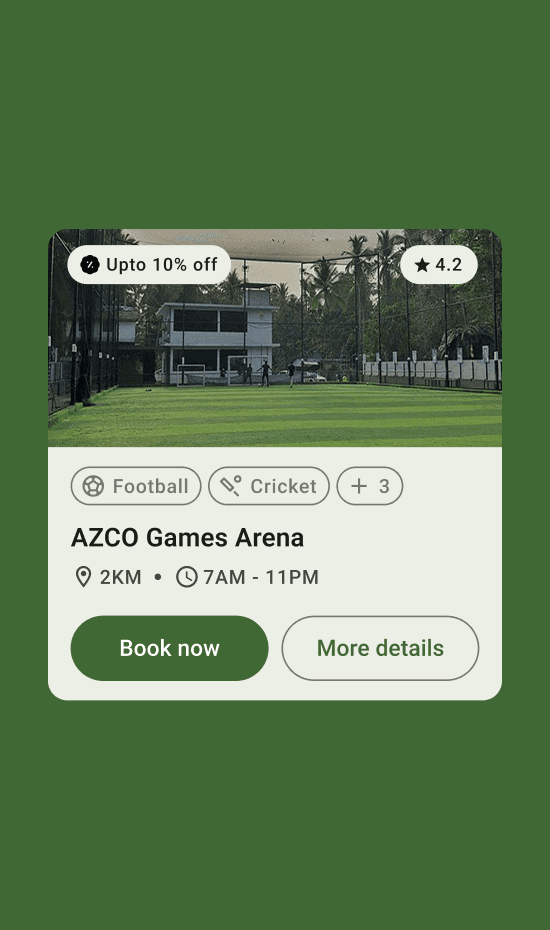
The turf card acts as a compressed preview of the full turf experience.
In one glance, users can understand the quality, relevance, and availability of a turf — and decide whether to explore further or move on.
This card needed to work equally well in fast scrolling, casual browsing, and purposeful searching.
Key decisions
Large visual preview to establish turf quality immediately
Rating and offers surfaced on the image to build trust early
Supported sports shown as chips for quick relevance checks
Distance and operating hours grouped to answer practical questions
Two clear paths: Book now for confident users More details for those who want reassurance
4. Turf Details:
From Discovery to Decision
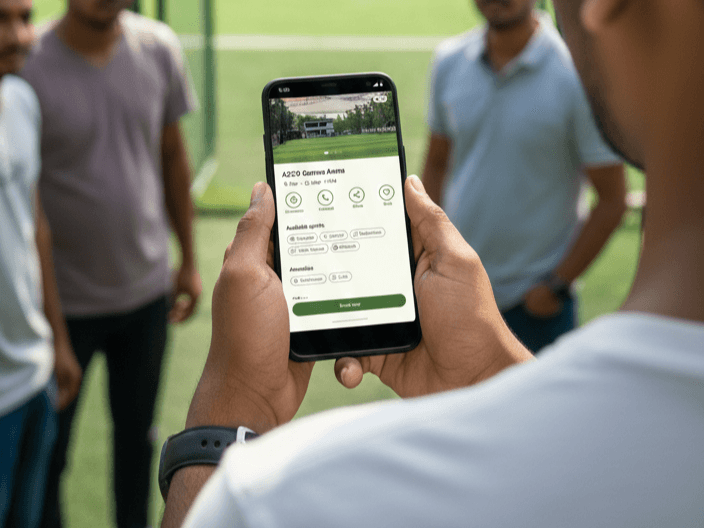
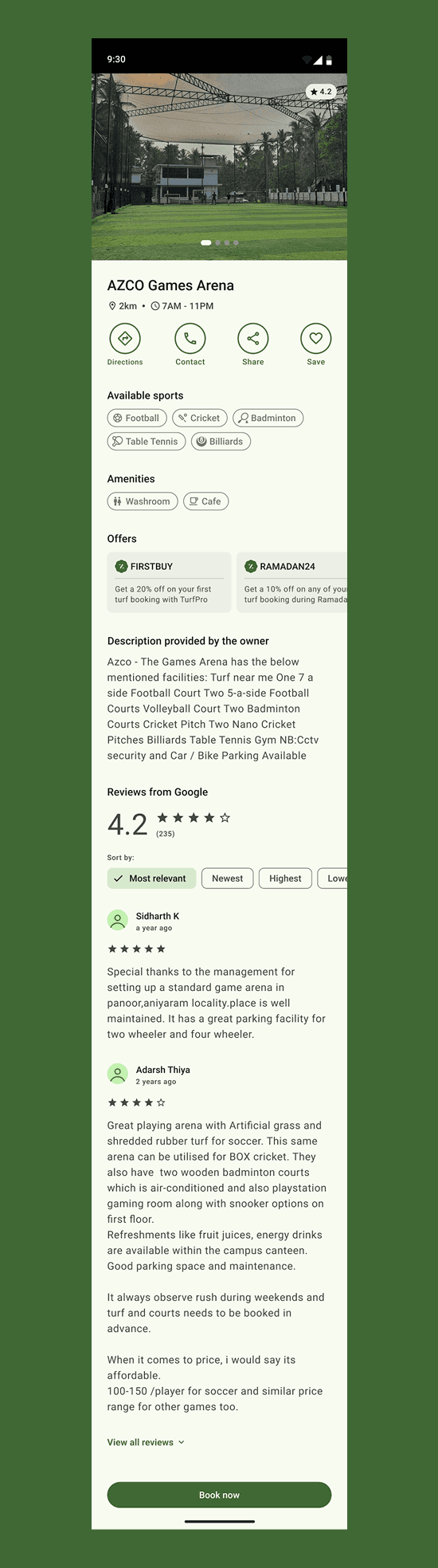
Discovery is over. This screen shouldn't sell; it should remove hesitation. The goal is to answer one question: 'Can I trust this place enough to book right now?
4.1 Turf Identity
Making a Venue Feel Real
What this section is about
Before users look at prices or time slots, they need to recognize the turf.
This section establishes the turf’s identity using strong visuals, location context, and social proof — turning a generic listing into a real, physical place.
The large image header isn’t decorative. It’s functional. It helps users instantly judge turf quality, lighting, openness, and overall vibe — things that matter far more than specs in local sports bookings.
Key decisions
Full-width imagery to build trust before interaction
Turf name, distance, and operating hours grouped for instant validation
Rating surfaced early to anchor credibility
No booking CTA here — identity comes before action
4.2 Quick Actions
Utility Without Distraction
What this section is about
Once trust is established, users often want to do one quick thing before booking — check directions, call the venue, share it with friends, or save it for later.
These actions are surfaced immediately, but deliberately kept lightweight so they don’t interrupt the booking flow.
Key decisions
Directions, Contact, Share, and Save shown as icon-based actions
Equal visual weight — no action feels more “important” than another
Actions placed above the fold to reduce back-and-forth navigation
4.3 What You Can Play & What You Get
Scannable, Not Buried
What this section is about
Instead of long descriptions, supported sports and amenities are presented as visual chips. This allows users to answer practical questions instantly — Does this turf support my sport? Do they have basic facilities?
This section is designed to be skimmed in seconds, not read line by line.
Key decisions
Sports and amenities shown as chips for fast scanning
No icons-only representation — labels prevent ambiguity
Grouped logically to reduce cognitive load
4.4 Offers & Social Proof
Reassurance, Not Pressure
What this section is about
Offers and reviews exist to reinforce confidence, not force urgency. Discounts are visible, but not aggressive. Reviews are detailed, but external — pulled from Google to increase trust.
Key decisions
Offers shown as optional value, not flashing CTAs
Owner description clearly separated from system-generated content
Google reviews embedded to borrow third-party credibility
Sorting options included for users who want deeper validation
4.5 Booking Readiness
Action When the User Is Ready
What this section is about
Only after identity, facilities, and trust are established does the system ask the user to act. The “Book now” CTA is persistent, but calm — always available, never demanding attention.
Key decisions
Single primary CTA to avoid choice paralysis
CTA anchored at the bottom for reachability
No secondary booking actions competing for attention
5. Booking Flow:
The Heart of TurfPro
This flow represents the core promise of TurfPro: booking a turf should feel fast, predictable, and impossible to mess up.
Instead of spreading decisions across multiple screens or hiding context behind modals, the booking experience is designed as a single, progressive flow — where users always know what they’ve selected, what it costs, and what comes next.
The inspiration here comes from Google’s Play Store checkout patterns: clear hierarchy, minimal friction, and constant reassurance without unnecessary explanation.
5.1 Sport, Date & Time Selection
Clarity Before Commitment
What this section is about
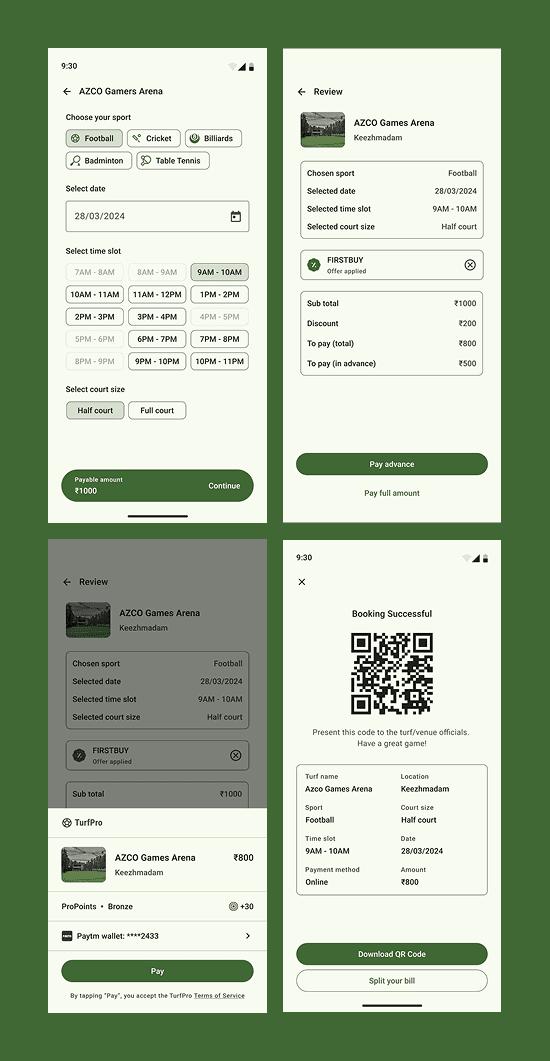
This screen lets users configure their booking in one place — without bouncing between steps. Sport type, date, time slot, and court size are treated as inputs, not separate flows.
The goal is to reduce mental overhead by keeping everything visible and editable before payment enters the picture.
Key decisions
Sport selection uses assistive chips for quick scanning
Time slots are presented as discrete buttons instead of sliders
Unavailable slots are visibly disabled to avoid false hope
Court size is framed as a simple binary choice (Half / Full)
Payable amount updates instantly as selections change
5.2 Review & Pricing
Nothing Hidden, Nothing Surprising
What this section is about
Before payment, users see a clean, summary-style review — similar to a Play Store order confirmation.
This screen exists to build trust. It answers one question clearly:
“Is this exactly what I want to book?”
Key decisions
Booking details grouped in a single bordered container
Offers shown as applied, not promotional
Price breakdown clearly separated (subtotal, discount, payable)
Advance vs full payment presented as explicit choices
No editing buried here — changes happen earlier in the flow
5.3 Payment
Familiar, Fast, Reassuring
What this section is about
Payment follows familiar Android payment patterns to minimize hesitation. The interface avoids novelty and instead leans on recognition — wallets, saved methods, and a single primary CTA.
Key decisions
Turf details and amount remain visible during payment
Loyalty points shown as a passive reward, not a distraction
Primary action stays singular and dominant (“Pay”)
Legal text is present but visually de-emphasized
No secondary CTAs competing with completion
5.4 Booking Confirmation
Proof, Not Celebration
What this section is about
Once booked, the system immediately shifts from action to assurance. The QR code becomes the primary artifact — a tangible proof of booking that users can rely on at the venue.
Key decisions
QR code placed front and center
Booking details summarized for offline reference
Language stays functional, not celebratory
Download option prioritized over sharing
Clear instruction on how the QR will be used
6. Game Cards:
Turning Bookings Into Shared Play
What this SCREEN is about
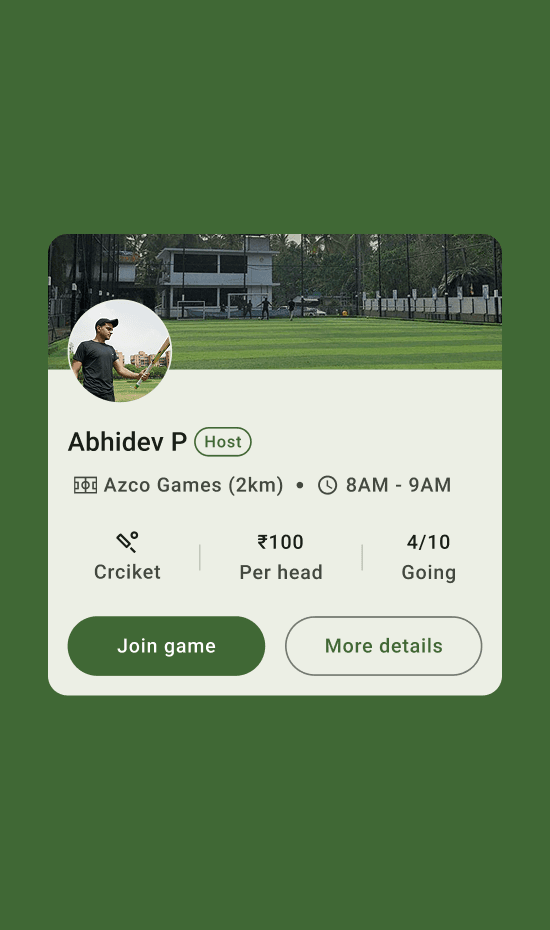
The Game Card acts as a lightweight invitation — not a full event page.
Its job is not to explain the game in depth, but to help users quickly answer, “Do I want to join this?”
By keeping the card compact and scannable, users can browse multiple games without friction and commit only when something feels right.
Key decisions
Host identity is shown first to establish trust
Turf name, distance, and time are grouped as secondary context
Sport type, price per head, and participation count are visually separated for quick scanning
“Join game” is the primary action, visually dominant
“More details” exists but does not compete with joining
Participation shown as 4/10 Going instead of abstract availability
7. Game Details
Context for Commitment
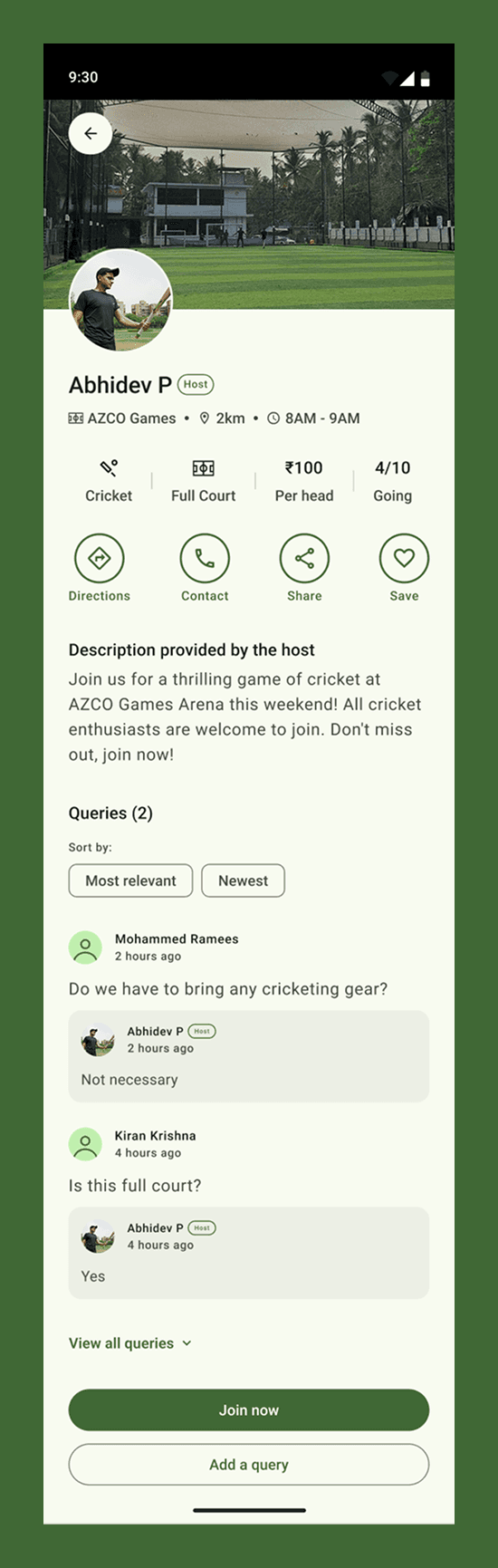
What this screen is about
The Game Details screen exists to help users commit with confidence.
While the game card answers “Should I look at this?”, this screen answers “Is this the right game for me?” It expands on the core details without introducing new complexity, keeping the experience familiar to users who’ve already seen the Turf Details screen.
Instead of reinventing patterns, the layout intentionally mirrors the turf detail structure — reinforcing consistency and reducing cognitive effort during decision-making.
Key decisions
Reused the Turf Details layout to maintain familiarity and reduce learning curve
Host identity and game context placed above the fold to establish trust
Sport type, court size, price, and participation shown as quick-scan metadata
Queries section included to replace external coordination (no WhatsApp dependency)
Host replies visually distinguished to maintain clarity and authority
“Join now” remains the single primary CTA
Secondary actions (Directions, Contact, Share, Save) kept lightweight and non-blocking
8. Creating a Game:
Lowering the friction to play together
What this SCREEN is about
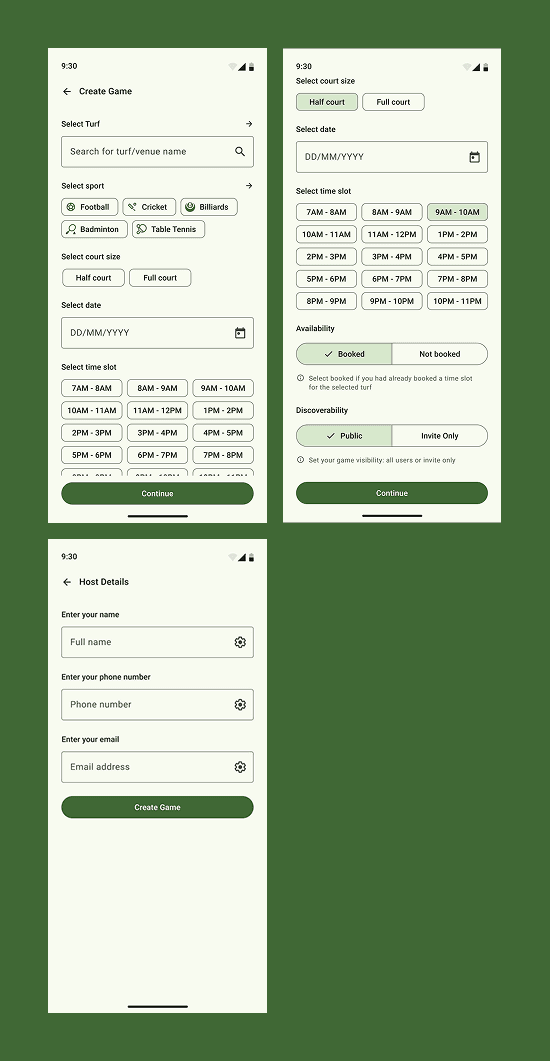
Creating a game in TurfPro is a coordination flow, not a setup-heavy form. If a user knows where and when they want to play, the system helps them open that slot with minimal effort. By mirroring the booking mental model, users can define their game and set privacy—without learning a new interaction pattern.
Key decisions
Game creation follows the same structure as turf booking to reduce learning overhead
Assistive sport, time, and court selectors avoid unnecessary navigation
Availability toggle separates already booked vs not booked scenarios clearly
Discoverability (Public vs Invite Only) is surfaced early to set expectations
Host details are collected at the end to avoid breaking momentum
No advanced options or pricing complexity in the initial flow — defaults do the work
Designed to work whether the turf is booked inside or outside TurfPro
ProPoints: &
A lightweight loyalty system to reward repeat play
ProPoints is TurfPro’s built-in loyalty layer designed to reward users for doing what they already come to the app for—booking turfs, creating games, and playing regularly. Instead of discounts feeling random or hidden, rewards are made visible, progressive, and easy to understand.
Users earn points through clear actions (bookings, games, referrals) and can redeem them directly as credits toward future bookings. The system introduces a sense of progression (Amateur → higher levels) without turning the app into a game-first product. It stays supportive, not distracting.
The goal here wasn’t heavy gamification—it was retention through clarity, fairness, and small wins that actually feel useful.
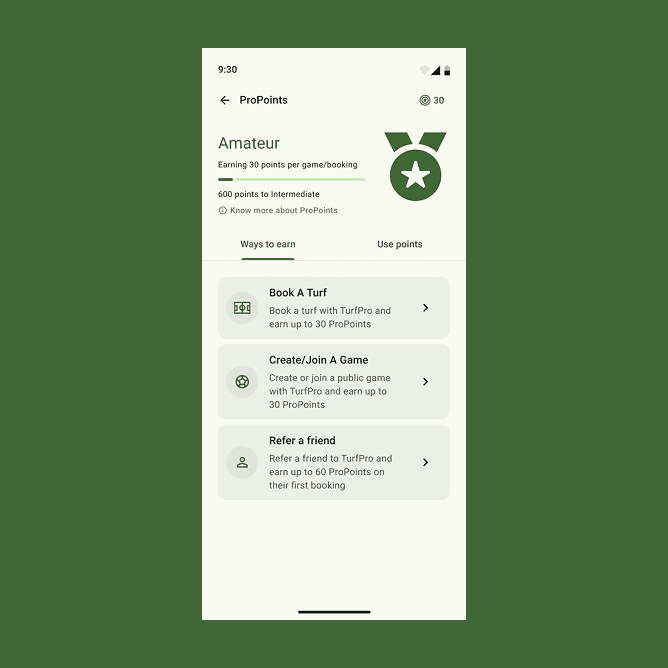
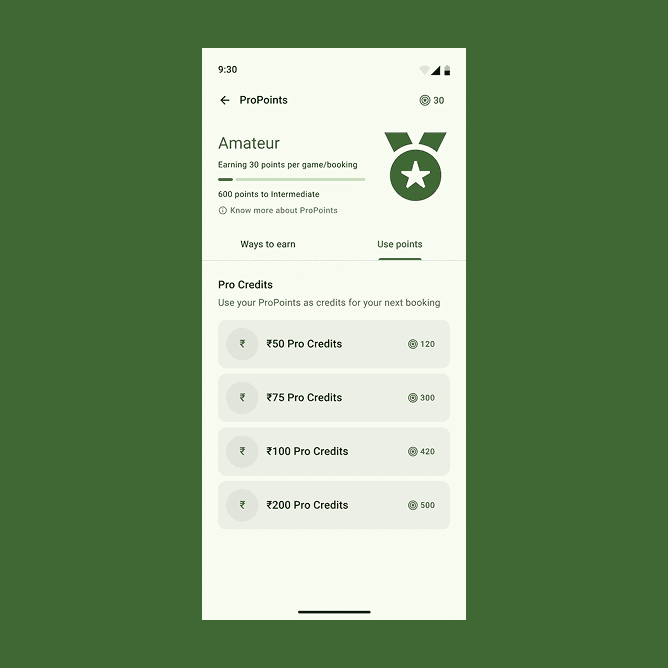
A lightweight loyalty system that rewards bookings and games
Final Screens:
Account, history, and everything that follows play
These screens handle everything that comes after play—profile, bookings, games, rewards, and support. They’re designed as a quiet, predictable space where users can review activity, manage their profile, and track progress without friction. No noise, no clutter—just clarity and continuity when users aren’t actively booking or playing.
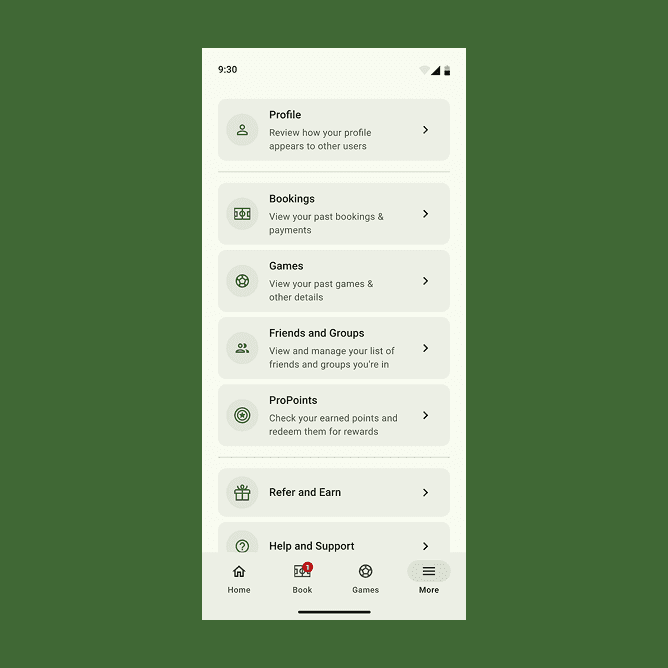
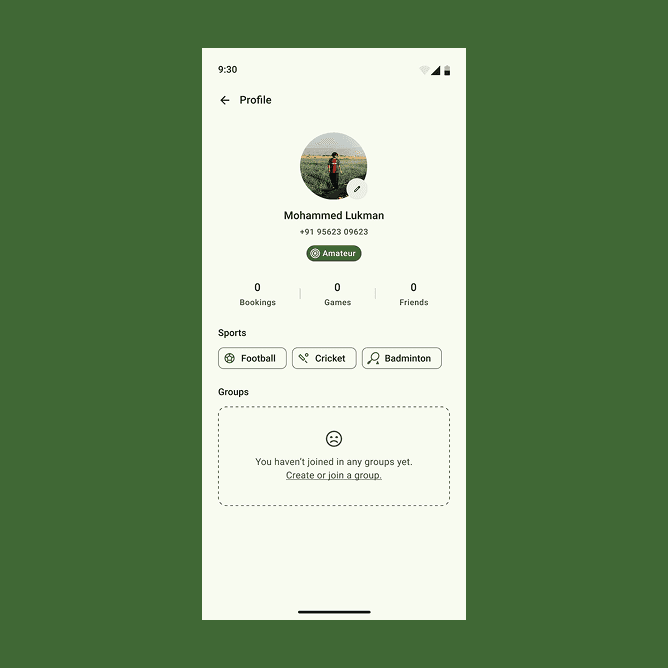
Profile and account surfaces that give users visibility into their activity, rewards, and settings
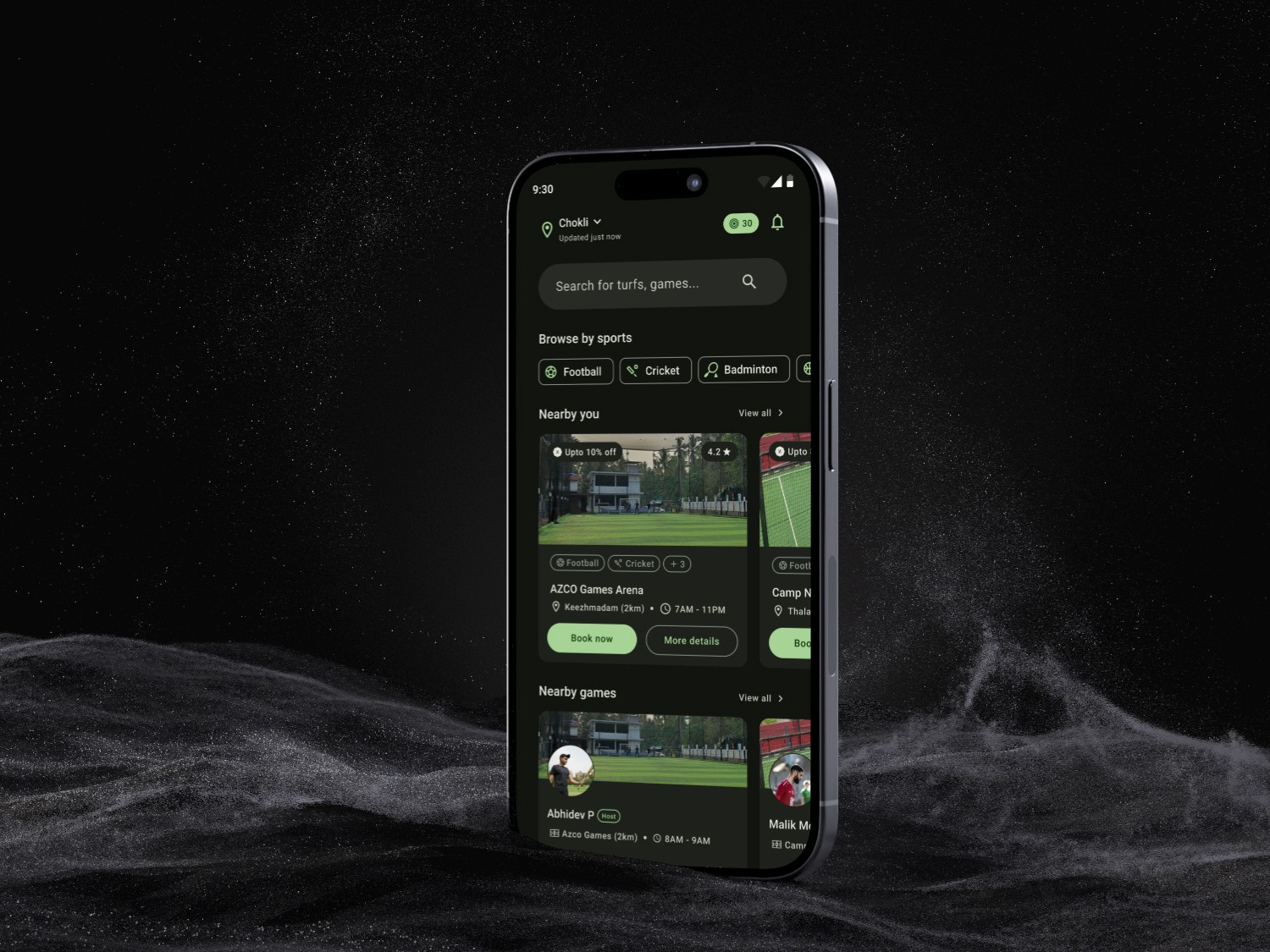
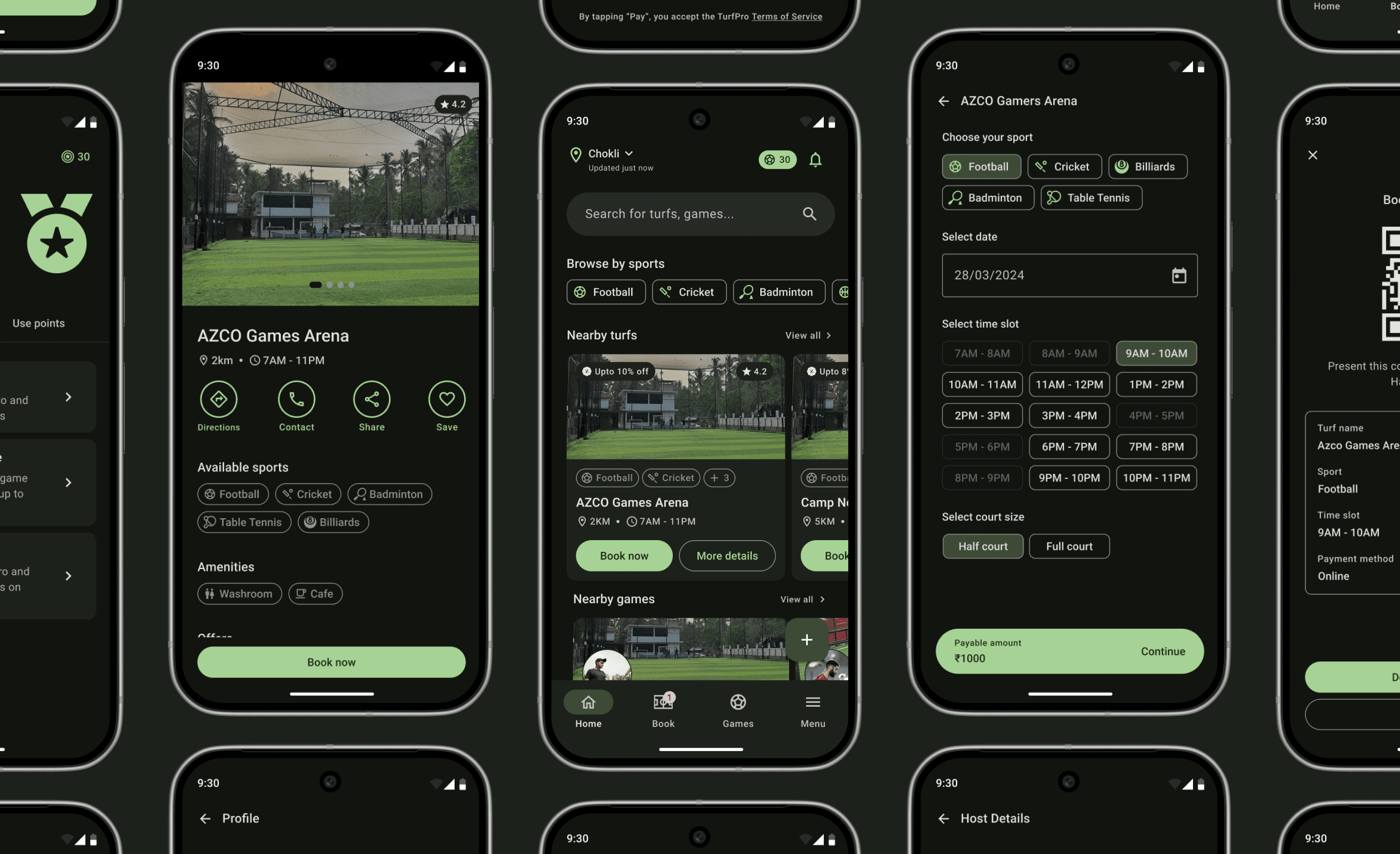
Designed for late-night bookings and low-light environments, Dark Mode maintains clarity and contrast while preserving TurfPro’s calm, sport-centric visual identity.
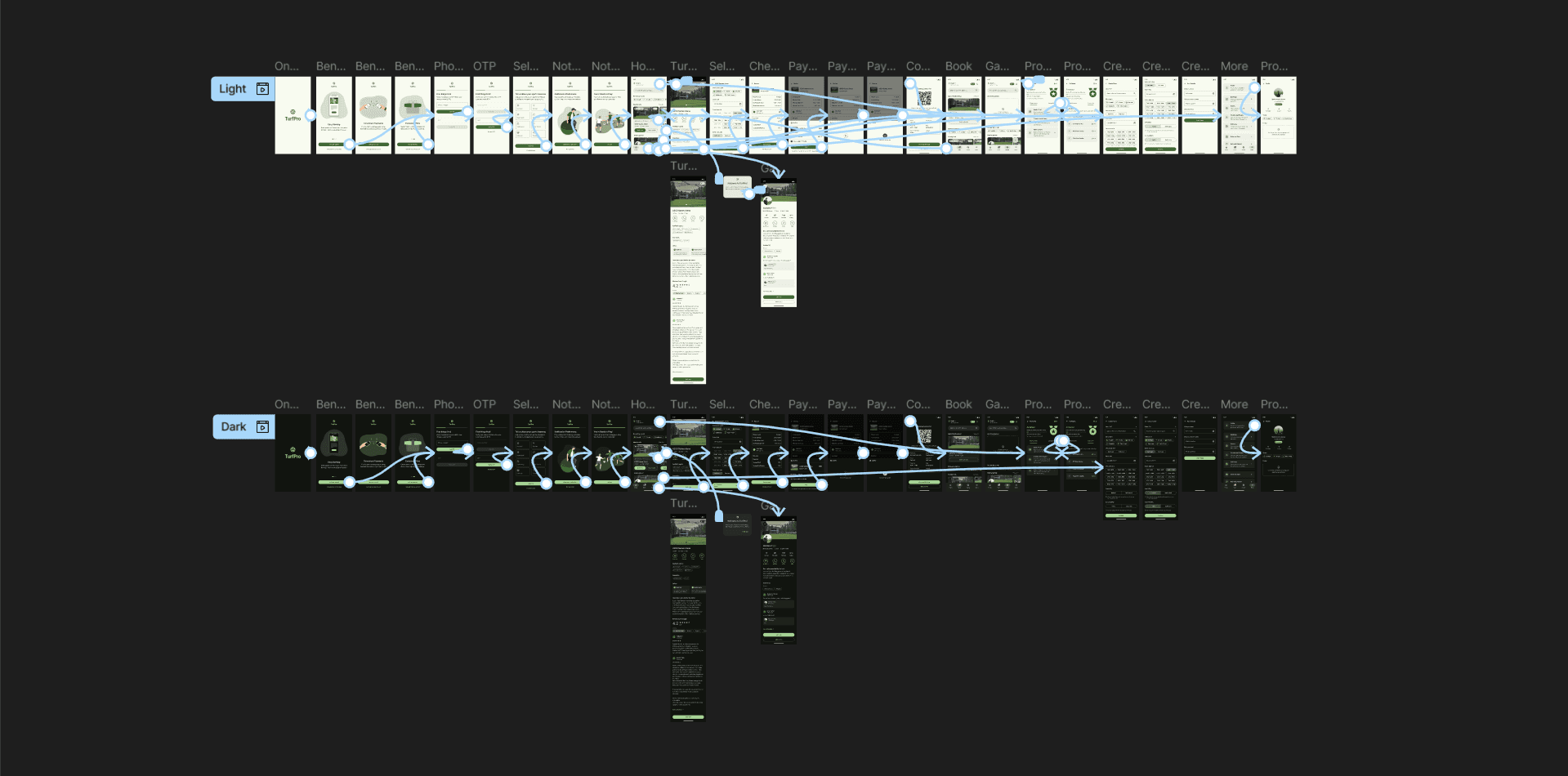
Design decisions in motion—layouts, iterations, and structure as they evolved.
Expected
Impact
While this project wasn’t shipped or tested at scale, it was designed with clear behavioral outcomes in mind—based on local usage patterns, competitive gaps, and real-world turf booking constraints.
1. Less friction in turf discovery and booking
By surfacing only what matters in the moment, users don’t have to jump between airline apps, Wallet, Maps, and notes to understand what to do next.
2. Action-first guidance, not passive updates
Assistive sport filters, time-slot pills, and court size selectors minimize cognitive load, allowing users to move from intent to confirmation in just a few steps.
3. Higher trust through transparency
Clear pricing breakdowns, visible offers, Google-sourced reviews, and booking confirmations (QR-based) help users feel confident about where, when, and what they’re paying for.
4. Stronger social play through game creation
By enabling users to create and join public games, TurfPro shifts from a pure booking utility to a social sports platform—making participation easier even without a full group.
5. Increased retention via lightweight rewards
ProPoints introduce a simple incentive loop—book, play, earn—encouraging repeat usage without turning the experience into a complex loyalty system.
6. Accessibility for local communities
By supporting smaller, local turfs often ignored by larger platforms, TurfPro creates visibility and structure for venues that previously operated offline.
Closing
Thoughts
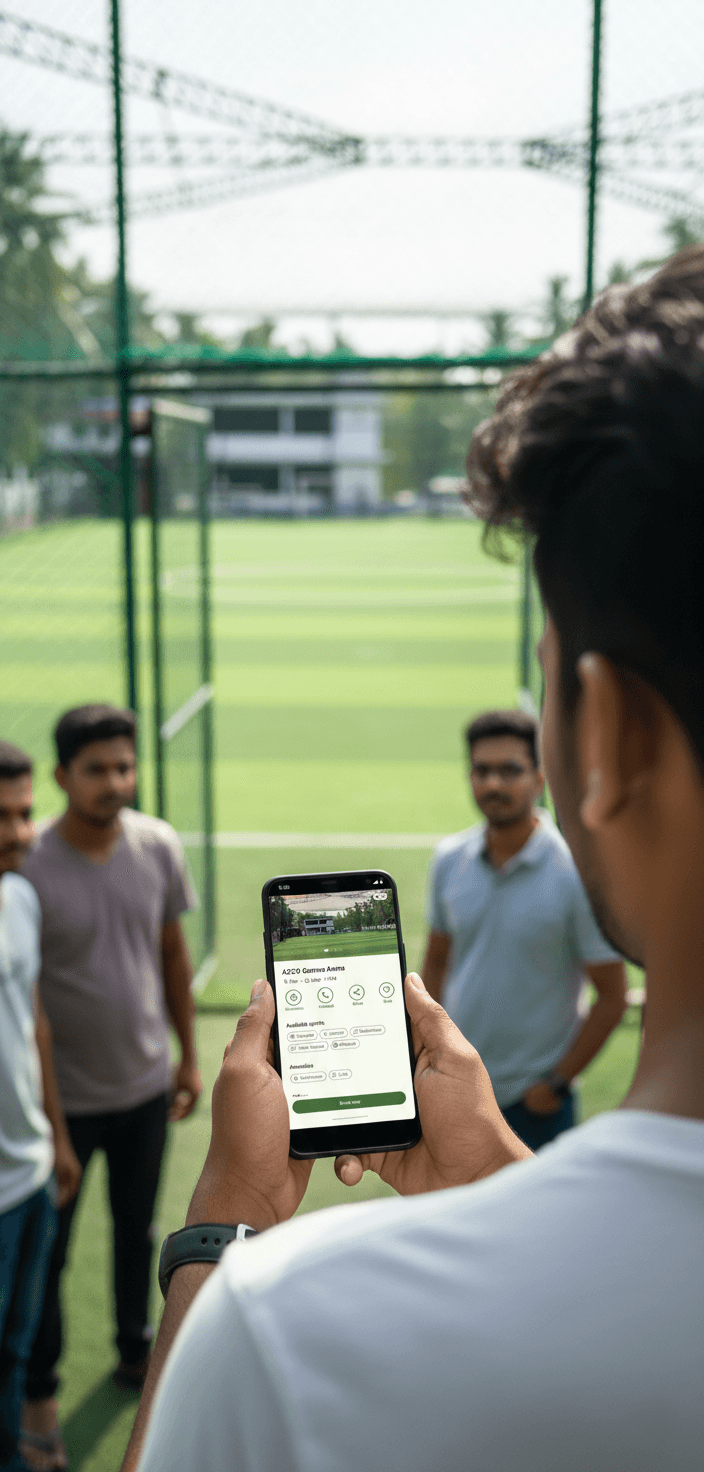
TurfPro came from a very real place — watching friends struggle to book turfs through calls, WhatsApp messages, and half-reliable promises, & realizing how unnecessary that friction was.
Working on TurfPro also taught me the value of restraint. Instead of copying everything competitors were doing, I focused on what mattered for a local community — clarity, speed, and trust. The goal wasn’t to do more, but to do the essentials well.
Related
Work


VIEW ALL